Privacy-first personal finance

Personal finance,
fully yours.

Budget Buddy is a local-first money tracker for people who actually want to understand their finances — multi-currency, multi-account, with debts, assets, goals, budgets and inflation-adjusted net worth. iOS, Android and macOS, no account required.

Local-firstOpen backup formatNo account requiredMulti-platform
Bank statement import
Multi-currency
Inflation-adjusted
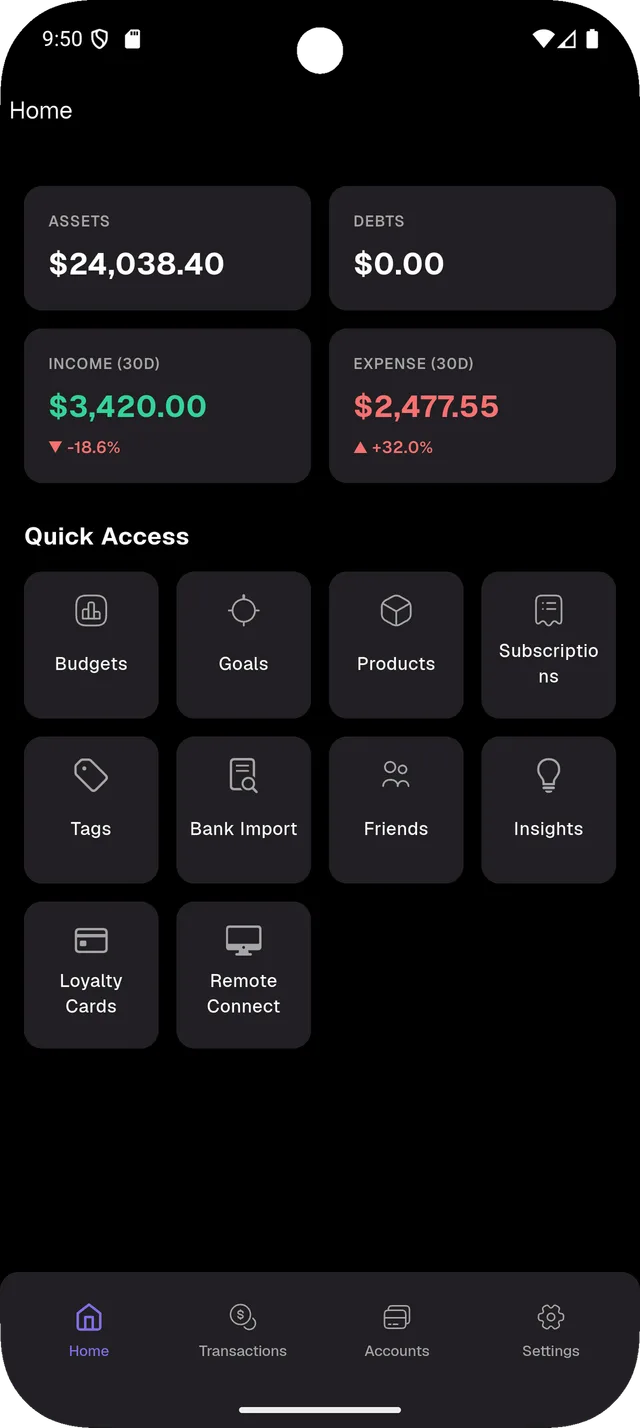
Budget Buddy home screen showing assets, debts, income, expense and quick-access tiles
0
Offline-capable
0
Bank CSV formats
0
Sign-ups required for the core app
Accounts you can create
Why Budget Buddy

Three things every other money app gets wrong.

Privacy by default

Your transactions never leave your device unless you choose. Backups go to your Google Drive, in your account, in a folder you control. We don't run a server you have to trust.

  • SQLite database stored locally on every device
  • Optional Google Drive backup — saved to a folder you own
  • Open ZIP backup format — restore anywhere, anytime
  • Optional passcode plus biometric lock
  • Incognito mode masks amounts behind emoji on long-press
Real financial modeling

Built for people who want more than a category pie chart. Track net worth, asset liquidity, debts to friends, inflation-adjusted purchasing power, multi-currency, and historical exchange rates.

  • Assets, liabilities, income, expense — proper double-entry roots
  • Liquid vs. illiquid asset tagging
  • Historical exchange rates (every transaction uses the rate from its date)
  • Inflation periods per currency, applied to charts
  • Multi-currency accounts (single, selected, or all currencies)

Works the way you do

Quick voice entry, bank statement import, transaction templates, recurring subscriptions, goals, budgets, products, loyalty cards. Turn on what you need, hide what you don't.

  • Every feature is toggleable in Settings → Features
  • iOS, Android, macOS, Windows, Linux from one Flutter codebase
  • Home-screen widgets on iOS and Android
  • Remote browser console — manage from any browser on the same Wi-Fi
Import

Drop a CSV, get reconciled transactions.

Budget Buddy reads bank statement CSVs from six bank formats out of the box. Drop a file in your Google Drive folder and the app picks it up, matches it against your existing entries, and shows you exactly what's new, what's a duplicate, and what's a date or time discrepancy to fix in one tap.

  • Supported formats: Monobank, Revolut, Santander, AlfaBank Belarus, mBank Company, Pekao
  • Google Drive auto-pickup — one folder per bank, per account
  • Smart deduplication via Drive checksums plus file metadata
  • Date/time discrepancy fix screen — "Fix all" or review one-by-one
  • Multi-currency child-account matching (e.g., Revolut EUR/USD/PLN)
  • Open CSV directly from Files, Telegram, or any sharing app
  • Browser-based bulk upload via the Remote Console
Debt tracking

Owe a friend? Both of you see the same balance.

Liabilities aren't just credit cards. Track money lent to or borrowed from friends, with both sides in sync. Each person picks their own local liability account — names don't have to match. Only the minimum data is shared: amount, currency, date, memo, optional receipt.

  • Linked liability accounts sync between two friends
  • Pending shared items appear in the Friends tab — accept, reject, or categorize
  • Historical backfill: existing liability transactions auto-propose for sync
  • Friend's avatar shows on the linked liability account
  • QR-code profile sharing — scan to add a friend
  • Receipt photos via Firebase Storage; structured data via REST
  • Net worth correctly subtracts liabilities and reduces goal targets
Assets

Cash, banks, investments, products — all in one number.

Budget Buddy understands that not every asset is the same. Tag accounts as liquid (immediately spendable) or illiquid (locked up). Track physical and digital products you own with current valuations. See your real net worth across every currency, optionally adjusted for inflation.

  • Four root account types: Assets, Liabilities, Income, Expense
  • Unlimited nested sub-accounts (e.g., Assets → Bank → Revolut → EUR)
  • Multi-currency accounts: single, selected list, or every currency
  • Liquid asset toggle for "how long can I live on savings?" insights
  • Products tab: track items you own with new and used market prices
  • Net worth chart with inflation-adjusted overlay
  • Net worth drivers: top gainers and decliners per period
Insights

Charts that respect your data.

Statistics use historical exchange rates per transaction, not today's rate retroactively. Inflation adjusts charts to real purchasing power. The Insights tab surfaces no-spend streaks, savings rate, average per-day income and expense, subscription totals, and "how long can you live on savings" projections.

  • Net worth, income vs. expense, and product distribution charts
  • Savings rate, no-spend streaks (current and longest)
  • Subscription summary aggregating all recurring payments
  • Sankey diagrams for money flow (where income goes)
  • Cost decomposition popups with per-transaction historical FX
  • Filter by accounts, tags, currency, date range, products, amount
  • Toggle inflation, liquidity, and product valuations on each chart
Goals

Set savings or payoff targets. Watch them fill.

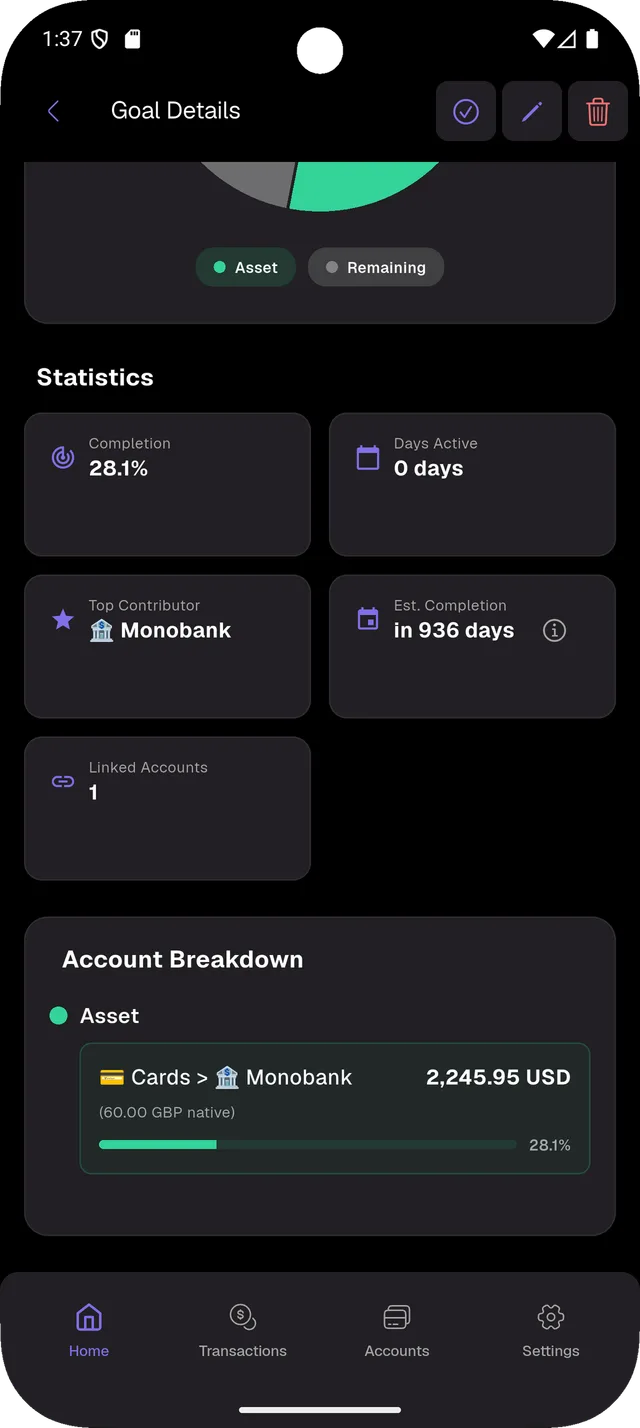
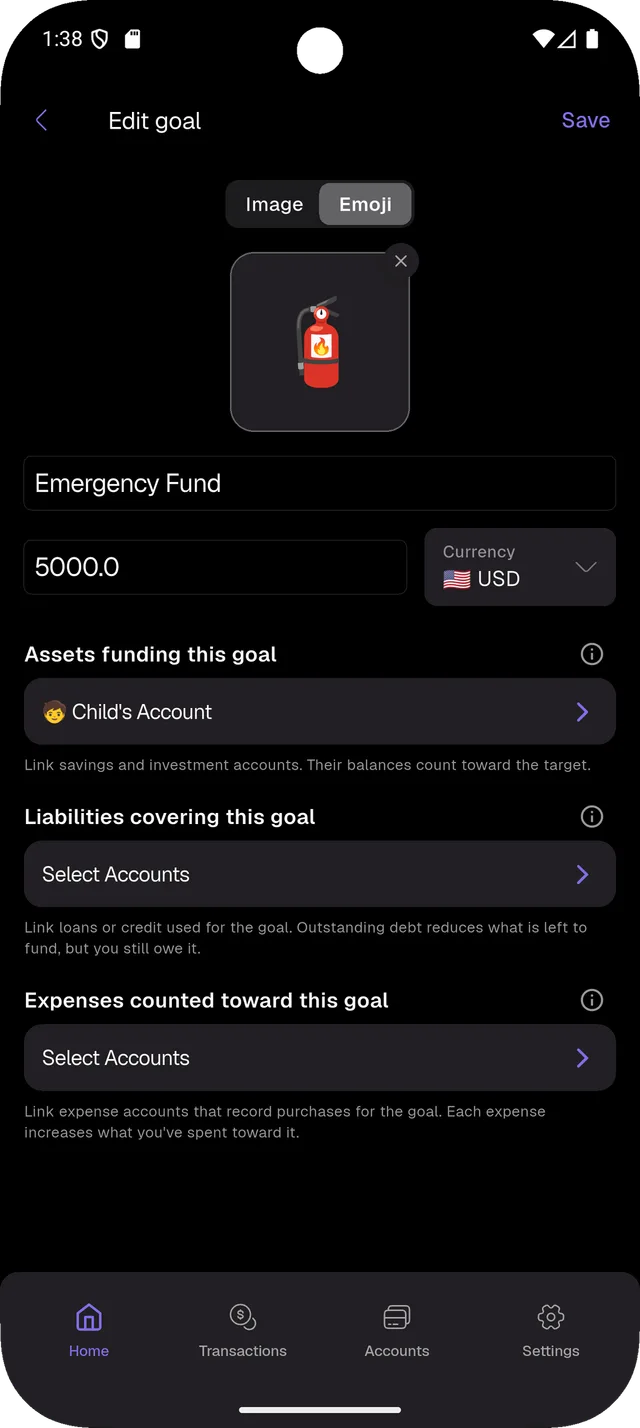
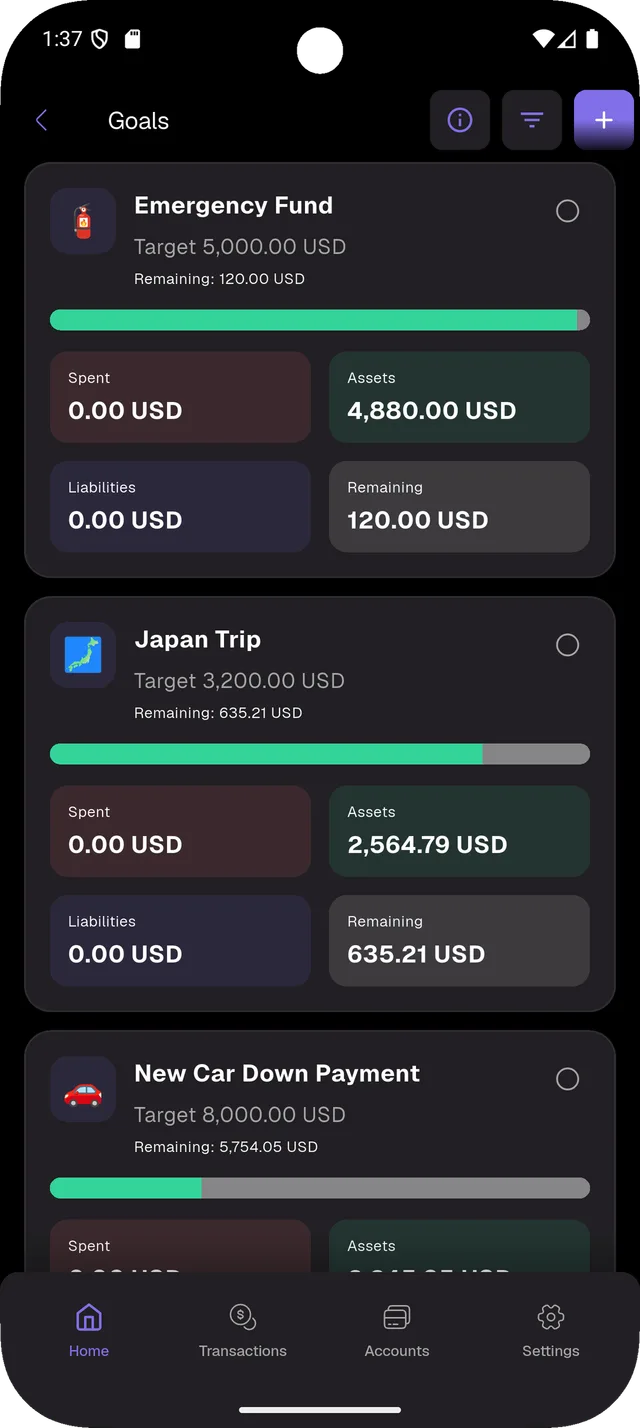
A goal is a target amount in any currency. Link the asset accounts whose balances count toward it, the liabilities you want to pay down, and the expense categories where every purchase is real progress. Budget Buddy draws a single progress bar across all three and tells you who's contributing the most and when you'll get there.

  • Link multiple asset accounts — their balances count toward the target
  • Link liabilities — outstanding debt reduces what's still left to fund
  • Link expense accounts — every purchase counts as progress
  • Top contributor + estimated completion based on recent activity
  • Per-account breakdown with progress bars and native-currency amounts
  • Multi-currency goals — each linked account converts to the goal's currency
  • Mark a goal as complete when you've hit it, archive any time
Budgets

Cap spending per category. See overruns immediately.

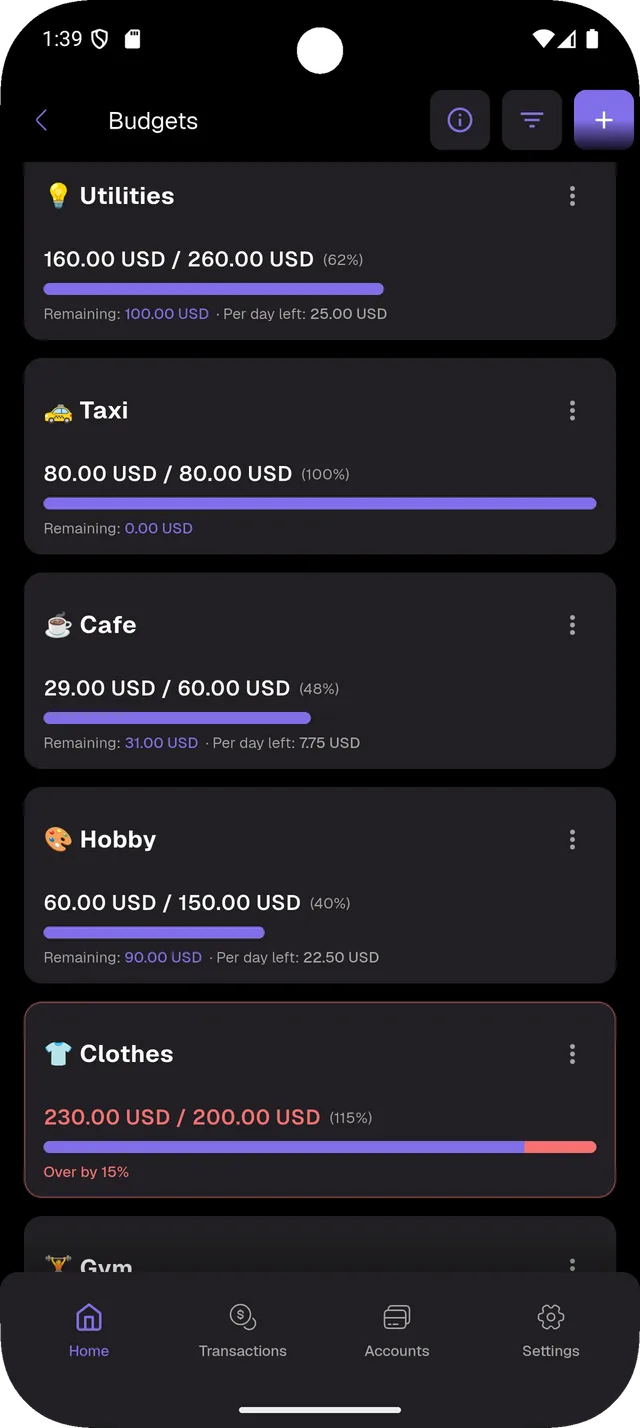
Budgets are a different mental model from goals: a hard ceiling on how much you can spend in a category over a period. Pick the category, the amount, and the period — the app does the math, shows you what's left, and tells you exactly how much you can spend per day to stay under the cap.

  • One ceiling per expense category, in any currency
  • Daily allowance auto-calculated for the remaining days of the period
  • Live progress bar with under / at / over states
  • Over-budget alerts with the exact overrun percentage
  • Independent from goals — track spending discipline without a savings target
  • Roll-up summary across all active budgets at a glance
Subscriptions

Catch every renewal. See what you're really paying.

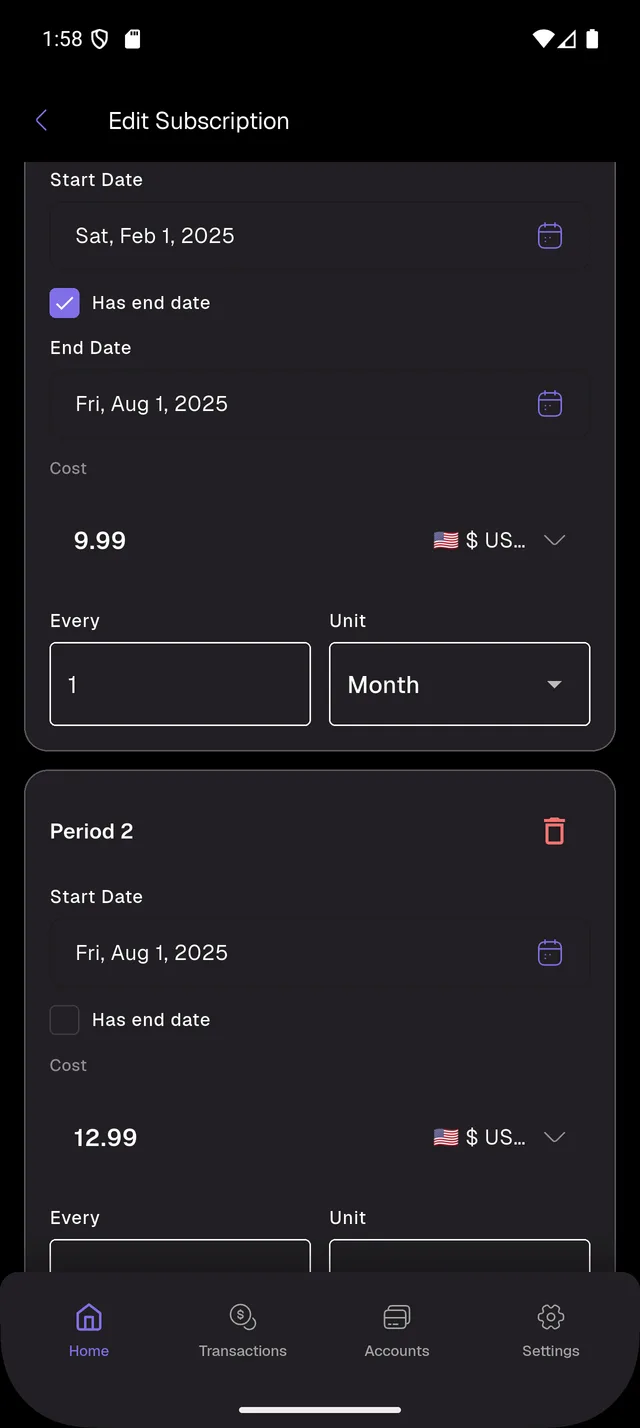
Most apps treat subscriptions as a flat monthly cost. Real life isn't flat — Netflix raises prices, your gym switches to annual billing, your phone plan goes from monthly to yearly. Budget Buddy models that with multi-period pricing: each subscription is a chain of (start, end, cost, frequency) periods, so the totals you see are what you actually paid.

  • Multi-period pricing — chain price hikes, plan changes, billing-frequency switches
  • Any frequency: every N days, weeks, months, or years
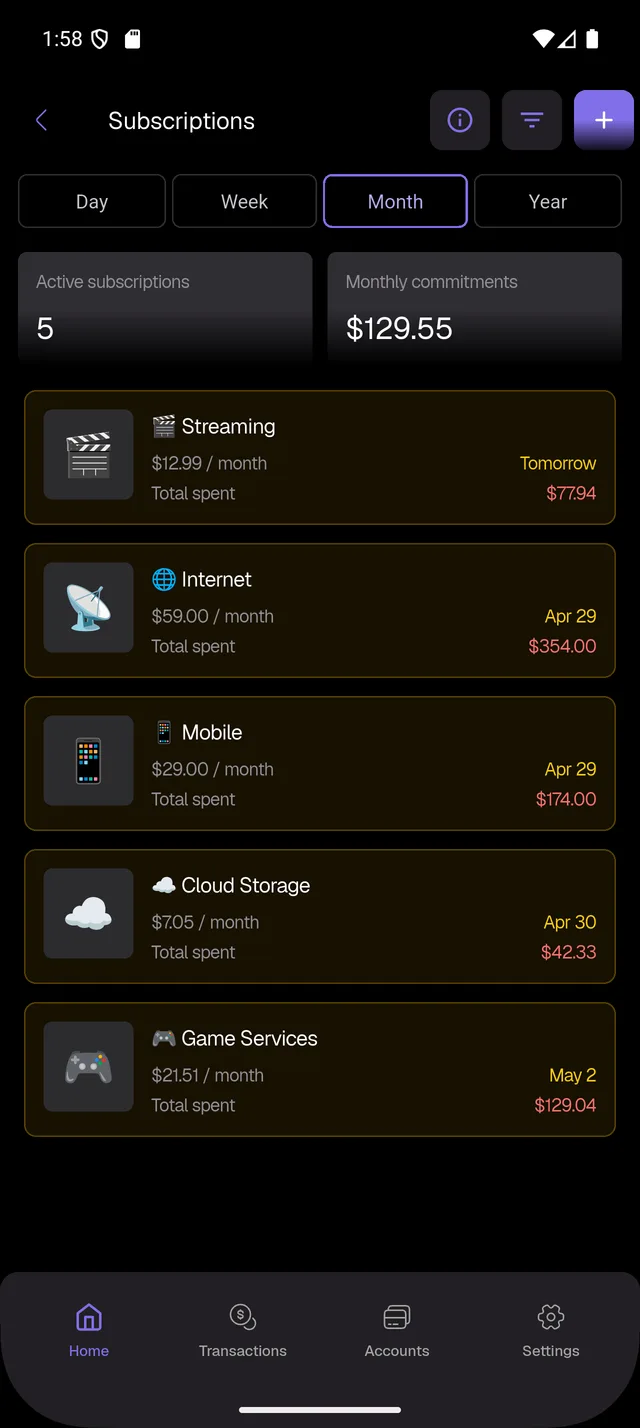
  • Day / Week / Month / Year aggregation across all subscriptions
  • Active count + total commitment for the chosen period
  • Per-row card with next renewal date, current price, and total spent so far
  • Multi-currency — each subscription priced in its own currency
  • Optional end date — flag a subscription as cancelled without losing history
Your data

Local-first. Backed up where you say.

Budget Buddy stores everything in a SQLite database on your device. Backups are written to your own Google Drive folder, in an open ZIP format you can read with any unzip tool. The app can lock with a passcode plus Face ID or fingerprint, and Incognito mode hides amounts behind emoji at the long-press of a tile.

  • All data lives in local SQLite — works fully offline
  • Backups stored under YOUR Google Drive: BudgetBuddy/Backups/
  • Open ZIP format — restore on a new device or another platform
  • Auto-backup on schedule, manual on demand
  • Passcode plus biometrics with configurable auto-lock timeout
  • Incognito mode: long-press any summary tile to mask all amounts
  • Demo mode: one-tap full reset with a rich seeded dataset
Desktop companion

Manage from any browser on your Wi-Fi.

Open the Remote Access screen on your phone, scan or type the address on a desktop browser, enter the one-time passcode, and you're in. Bulk import bank CSVs, filter transactions, and review imports on a real keyboard.

  • One-time passcode authentication, never leaves your local network
  • Browser bank import with country flags and currency chips
  • Match against on-device cache without re-uploading files
  • Same matcher as the phone — fully consistent
  • Bulk delete and date/time discrepancy fixes from the desktop
Optional · Pro

Ask Budget Buddy. Confirm before it acts.

Bring your own OpenAI key. The Agent reads your data through a read-only SQLite layer and proposes new transactions, accounts, subscriptions, and products as drafts you confirm explicitly. No background telemetry. No raw SQL exposure. Disable any time.

  • Bring-your-own OpenAI API key (stored in secure storage, not preferences)
  • Explicit consent toggle in Settings → AI before anything is sent
  • Read-only database access — no raw SQL, no arbitrary code
  • Every write is a draft until you tap confirm
  • Voice transaction entry with editable transcripts
  • Receipt photo recognition
Pricing

Free for everyone. Pro for power users.

Free

Everything you've read above is free.

Privacy, multi-currency, debts, assets, insights, statements, browser console — no paywall, no sign-in, no asterisks.

Pro

Unlock the Agent and quick-access tiles.

Pro unlocks the AI Agent, premium templates, and advanced quick-access tiles. Subscribe via App Store or Google Play, manage anytime.

See Pro features →
iOSAndroidmacOSWindowsLinux

One Flutter codebase. One database format. One backup that works on all of them.

FAQ

Questions, answered.

Is my data sent to a server?
No, by default. Everything is on-device SQLite. Backups go to your Google Drive only when you sign in. Friend liability sharing and receipt uploads are the only opt-in network features.
Do I need an account?
No. The app works fully without sign-in. Google sign-in is only required for Drive backups and bank statement auto-pickup.
What banks do you support?
Six CSV formats today: Monobank, Revolut, Santander, AlfaBank Belarus, mBank Company, Pekao. More on request.
Can I restore on a different platform?
Yes. The backup ZIP is the same format on iOS, Android, macOS, Windows, and Linux.
Is the AI Agent required?
No. It's off by default. You bring your own OpenAI key, you toggle a consent flag, you confirm every write.
How does inflation adjustment work?
You define inflation periods per currency (start, end, rate). The app scales historical amounts so charts show real purchasing power. Toggle it off any time.
Where can I read the docs?
The full Documentation lives at the Documentation tab in the navbar. It walks through bank statement import, account hierarchy, and per-bank export guides.

Take your money seriously.
Without giving it away.

Free download. No account required. Your data stays on your device.